
Version: SG FLX
Customizing the login page
You can fully customize the login page to adapt it to your needs. Per default, the login page shows the following elements:
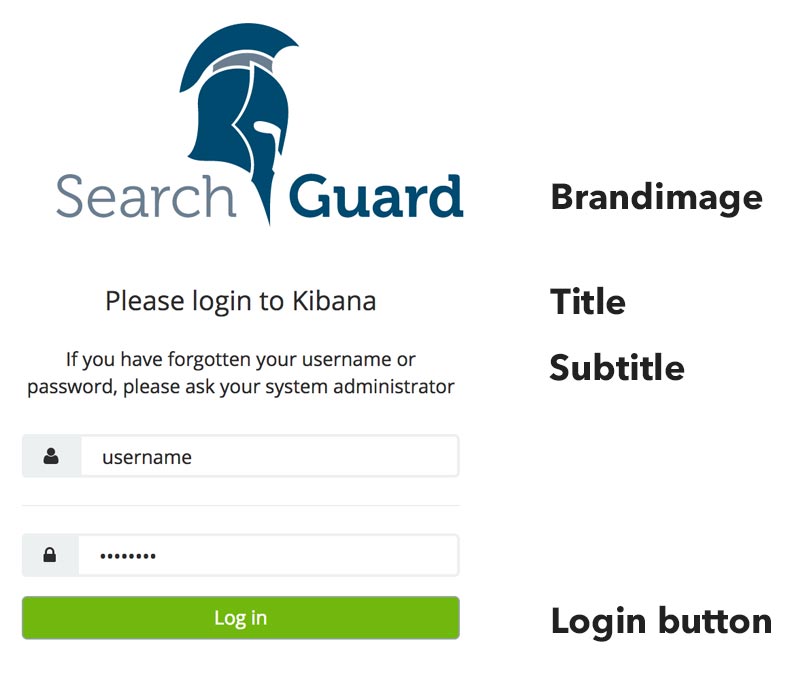
You can use sg_frontend_authc to customize the login page. Such a configuration can look like this:
copy
default:
login_page:
brand_image: "https://mycompany.example.com/mylogo.png"
title: ""
button_style: "background-color: green"
authcz:
- type: basic
Alternatively, you can configure login_page.brand_image with a Base64-encoded data URL:
copy
default:
  login_page:
    brand_image: "data:image/png;base64,iVBORw0KGgoAAAANSUhEUgAAAT4AAABVCAQAAAB6dUCWAAAAIGNIUk0AAHomAACAhAAA+gAAAIDoAAB1MAAA6mAAADqYAAAX..."
These options are available:
login_page.brand_image: An absolute URL to your brand image or a Base64-encoded String of your image
login_page.show_brand_image: Set this to false when you want to have no brand image at all on the login page.
login_page.title: Title of the login page. Can contain HTML tags.
login_page.button_style: Style attribute of the login button.