
Signl4 Actions
Content
Use Signl4 actions to send mobile alerts to your team via Signl4. Signl4 provides mobile push notifications, SMS, and voice calls for critical alerts.
Overview
Signl4 is a mobile alerting service that ensures critical alerts reach the right people via push notifications, SMS, or voice calls. The Signl4 action type in Signals simplifies the configuration by providing:
- A dedicated “Signl4” option in the actions menu
- A URL field pre-filled with the Events API endpoint and placeholder for your team ID
- An API key field for authentication
- A default body format optimized for Signl4
This Signl4 action type is available in the Kibana UI. Via the REST API, create a webhook action as shown in the examples.
Prerequisites
Before you can use Signl4 actions, you need:
-
A Signl4 account - Sign up at signl4.com
- Your Signl4 Team ID - To get your team ID:
- Log in to the Signl4 portal
- Navigate to your team settings
- Find your Team ID (also called Webhook ID)
- A Signl4 API key - To create an API key:
- In the Signl4 portal, go to Integrations → API Keys
- Create a new API key
- Copy and save the key securely
The Events API endpoint you’ll use is:
https://connect.signl4.com/api/v2/events/{webhookIdOrTeamId}
Basic Functionality
Using the Kibana UI
When creating a watch in the Kibana UI:
- Click Add and select Signl4
- Enter a Name for your action
- Replace
{webhookIdOrTeamId}in the URL with your team ID - Enter your API key in the API Key field
- Customize the Body with your alert message
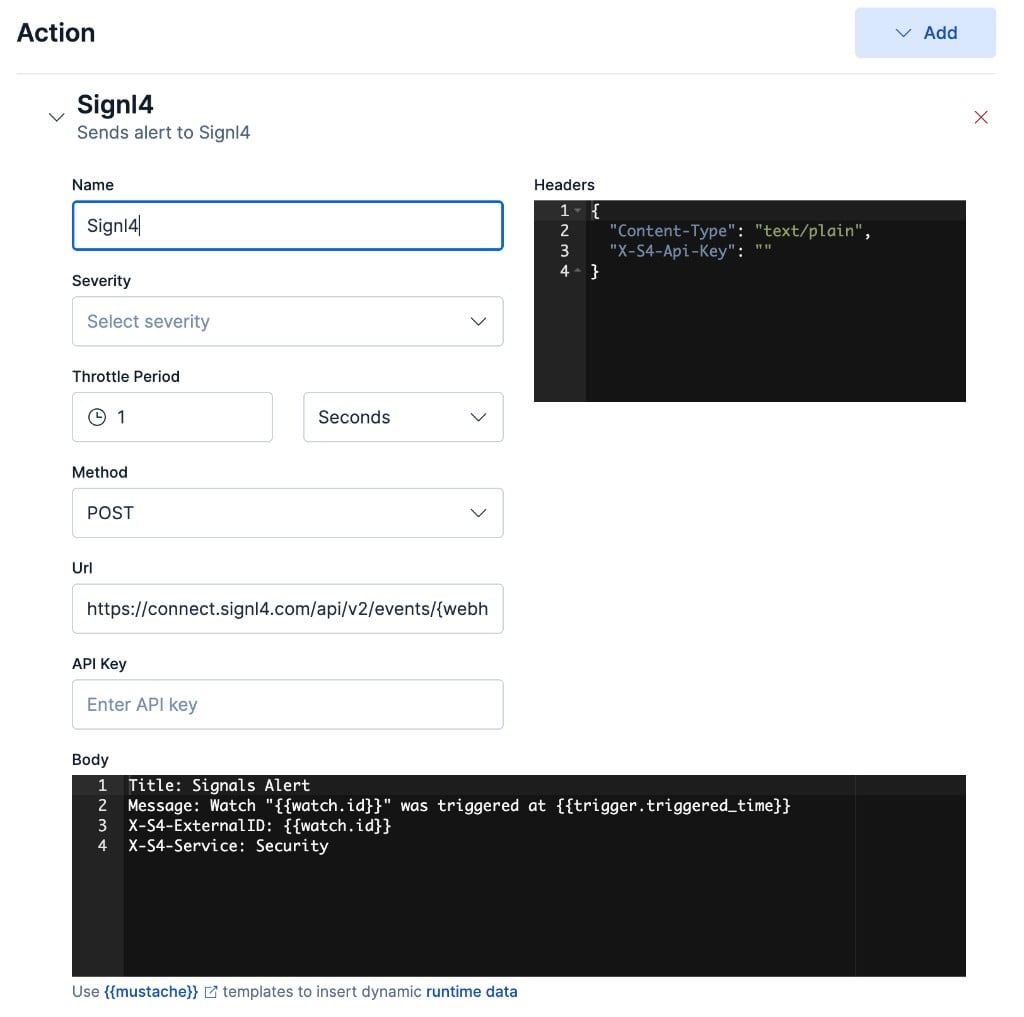
The default body uses a simple text format that Signl4 parses automatically:
Title: Signals Alert
Message: Watch "{{watch.id}}" was triggered at {{trigger.triggered_time}}
X-S4-ExternalID: {{watch.id}}
X-S4-Service: Security
JSON Format
A Signl4 action in JSON format looks like this:
{
  "actions": [
    {
      "type": "webhook",
      "name": "my_signl4_alert",
      "request": {
        "method": "POST",
        "url": "https://connect.signl4.com/api/v2/events/{webhookIdOrTeamId}",
        "body": "Title: Signals Alert\nMessage: {{data.mysearch.hits.total.value}} hits detected\nX-S4-ExternalID: {{watch.id}}",
        "headers": {
          "Content-Type": "text/plain",
          "X-S4-Api-Key": "your-api-key-here"
        }
      }
    }
  ]
}
Configuration Attributes
| Attribute | Description | Required |
|---|---|---|
type |
Must be webhook |
Yes |
name |
A unique name identifying this action | Yes |
request.url |
The Signl4 Events API endpoint including your team ID | Yes |
request.body |
The payload to send. Supports Mustache templates. | Yes |
request.headers |
HTTP headers, including X-S4-Api-Key for authentication |
Yes |
For additional configuration options such as throttling, authentication, and TLS settings, see Webhook Actions.
Customizing the Alert Payload
Signl4 accepts both text/plain and application/json payloads.
Text Format (Default)
Use key-value pairs, one per line:
Title: Signals Alert
Message: High error rate: {{data.mysearch.hits.total.value}} errors
X-S4-Service: Signals
X-S4-ExternalID: {{watch.id}}
X-S4-AlertingScenario: single_ack
JSON Format
When using JSON, set the header Content-Type: application/json.
{
  "title": "Signals Alert",
  "message": "High error rate: {{data.mysearch.hits.total.value}} errors",
  "X-S4-Service": "Signals",
  "X-S4-ExternalID": "{{watch.id}}",
  "X-S4-AlertingScenario": "single_ack"
}
Alert Title and Message
In the alert payload, use Title and Message as the parameter names for your alert content. Any additional parameters will be visible in Signl4’s alert details.
Signl4 Control Parameters
| Parameter | Description |
|---|---|
X-S4-Service |
Assigns the alert to a service category (e.g., “Security”, “Database”) |
X-S4-ExternalID |
External reference ID for correlating multiple events to a single incident |
X-S4-AlertingScenario |
single_ack (one person acknowledges), multi_ack (all on-duty must acknowledge), or emergency (notifies everyone regardless of duty status) |
X-S4-Location |
GPS coordinates as latitude,longitude (e.g., "40.6413,-73.7781") |
X-S4-Status |
Status management: new, acknowledged, or resolved |
Any additional fields you include (e.g., source, severity, environment) will be visible in Signl4’s alert details.
For more details, see:
- Signl4 Webhook Integration
- Signl4 Inbound Webhook Documentation
- Signl4 REST API
- Control Parameters Reference
Using Mustache Templates
You can use Mustache templates to include dynamic data from your watch checks:
Title: {{data.mysearch.hits.total.value}} errors detected
Message: Time: {{trigger.triggered_time}}
X-S4-ExternalID: {{watch.id}}-{{trigger.triggered_time}}
Webhook Endpoint (Alternative)
Alternatively, you can use the Signl4 webhook endpoint directly. This approach uses URL-based authentication and does not require an API key. Use the webhook endpoint:
https://connect.signl4.com/webhook/{webhookIdOrTeamId}
The request body format is the same as for the Events API. Here is a complete example:
{
  "type": "webhook",
  "name": "signl4_webhook",
  "request": {
    "method": "POST",
    "url": "https://connect.signl4.com/webhook/{webhookIdOrTeamId}",
    "body": "{\"Title\": \"{{data.mysearch.hits.total.value}} errors detected\", \"Message\": \"Watch {{watch.id}} triggered\"}",
    "headers": {
      "Content-Type": "application/json"
    }
  }
}
Note: The Events API endpoint with API key authentication is recommended for better security.
Advanced Options
Signl4 actions are built on Webhook Actions. For advanced configuration, refer to the webhook documentation:
- Dynamic Endpoints - Use Mustache templates in the URL
- TLS Configuration - Configure custom certificates
- Security Considerations - Restrict allowed endpoints